实习几天小结
ie10以下出现如图所示蓝色边框
结构为
<a href="#"><img src=""/></a>
通过取消img的默认样式即可
img{border-style:none;}
图片设置响应式伸缩
需要给img设置width:100%;
<!DOCTYPE html>
<html lang="zh">
  <head>
    <meta charset="UTF-8" />
    <meta name="viewport" content="width=device-width, initial-scale=1.0" />
    <meta http-equiv="X-UA-Compatible" content="ie=edge" />
    <title>Document</title>
    <style type="text/css">
      div>img {
        width: 100%;
      }
    </style>
  </head>
  <body>
    <div><img src="img/1.jpg" /></div>
  </body>
</html>
修改默认的select样式信息
开始想直接扔个图片上去应该能解决的,但是ie又不给力,在ie10以下都出现了兼容问题。不能取消掉原来的样式。
//ie10及以上可以通过如下取消掉select的默认样式信息,后来由于存在兼容性问题。果断重写select
 select{
            appearance:none;
            -moz-appearance:none;
            -webkit-appearance:none;
            -ms-appearance:none;
            }
           select::-ms-expand { display: none; }
重写后的select样式

图片可以去阿里的矢量图库去找 http://www.iconfont.cn/search/index?searchType=icon&q=up
html代码
<div class="copy_right_left">
          <ul class="select_box">
            友情链接<span></span>
            <li class="option_box">
              <a href="#" target="_blank">友情链接2</a>
            </li>
            <li class="option_box">
              <a href="#" target="_blank">友情链接3</a>
            </li>
          </ul>
          <!--</div>-->
        </div>
css代码
.copy_right_left ul {
  position: relative;
  margin-top: 3px;
  cursor: pointer;
  text-align: left;
  font-size: 14px;
  width: 180px;
  height: 22px;
  padding-left: 5px;
  line-height: 22px;
  border: 1px solid white;
  color: white;
  background: url(up.png) no-repeat right;
}
.copy_right_left ul li {
  padding-left: 5px;
  list-style: none;
  margin-left: -6px;
  border: 1px solid white;
  width: 180px;
  margin-top: -50px;
  background: rgb(0, 64, 143);
  display: none;
}
.copy_right_left ul li:hover {
  background: #000;
}
.copy_right_left ul li a {
  color: white;
  text-decoration: none;
}
单行显示和多行显示省略号
单行显示
效果图
要确定行的宽度
overflow: hidden;//超过的隐藏
text-overflow:ellipsis;//显示为省略号
white-space: nowrap;//在一行中显示
多行显示
1>效果图
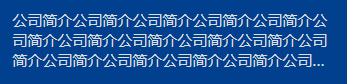
display: -webkit-box;
-webkit-box-orient: vertical;  //box-orient 属性规定框的子元素应该被水平或垂直排列
-webkit-line-clamp: 3;//超过3行显示省略号
overflow: hidden;
text-overflow:ellipsis;
2>效果图
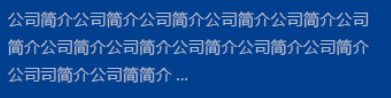
p::after {
  content: '...';
  padding: 0 10px 14px 5px;
  background: #fff;
}


